


Application-Consistent PostgreSQL Backups on Kubernetes: CloudNativePG, Barman, and Kasten
Most “database backup” stories on Kubernetes quietly cheat. You take a volume snapshot of the PVC, tick a box, and move on. The problem is that a raw volume snapshot of a running database is only crash-consistent — it’s the equivalent of pulling the power cord and hoping the database recovers cleanly on the way back up. Usually it does. Sometimes it doesn’t. “Usually” is not a backup strategy.
What we actually want is:
- An application-consistent backup — one the database engine itself coordinates, so it’s guaranteed restorable to a consistent point, with point-in-time recovery.
- That backup orchestrated alongside the rest of the application — the secrets,
services, and the cluster definition — so a restore brings back the whole app, not
just a
data.tar.gzyou then have to reassemble by hand.
This post walks through building exactly that for PostgreSQL, using three tools that each do one job well:
| Layer | Tool | Job |
|---|---|---|
| Run Postgres | CloudNativePG (CNPG) | Operator that runs HA PostgreSQL declaratively |
| Back up Postgres | Barman (built into CNPG) | PostgreSQL-native, application-consistent backup to S3 |
| Orchestrate it | Veeam Kasten | Trigger the DB backup and capture all the K8s resources |
Everything runs on a local Kubernetes cluster — in my case a bare-metal Talos cluster with Rook-Ceph for storage and MinIO providing S3 — but it maps cleanly to any cluster with a CSI storage class and an S3-compatible object store.
Here’s the whole flow. One policy run drives two parallel paths — the data goes out application-consistently via Barman, and the resources go out via Kasten — and a restore reassembles both:
flowchart LR
    P["Kasten Policy run<br/>(schedule + retention)"]
    P --> BP
    P --> EX
    subgraph DATA["DATA — application-consistent, PITR"]
      direction LR
      BP["BlueprintBinding →<br/>cnpg-bp Blueprint"] --> CB["CNPG Backup<br/>(barmanObjectStore)"] --> PG["PostgreSQL<br/>pg_backup_start / stop<br/>+ WAL archiving"] --> S3[("MinIO S3<br/>cnpg-barman<br/>base/ + wals/")]
    end
    subgraph RES["RESOURCES — the rest of the app"]
      direction LR
      EX["Kasten Snapshot + Export<br/>Secrets · Services ·<br/>Cluster spec · Backup objects"] --> KP[("Kasten profile<br/>kasten-backups")]
    end
    S3 -.-> R["Restore = Barman recovery cluster (data)<br/>+ Kasten restore (resources) = whole app back"]
    KP -.-> R
Part 1 — Deploy PostgreSQL with CloudNativePG
You could run Postgres from a Helm chart as a StatefulSet. But then day-2 — failover, backups, minor upgrades — is your problem. An operator encodes that operational knowledge as code: you declare what you want, it reconciles reality to match. CloudNativePG is the modern, Kubernetes-native choice.
Install the operator:
helm repo add cnpg https://cloudnative-pg.github.io/charts
helm repo update
helm upgrade --install cnpg --namespace cnpg-system --create-namespace cnpg/cloudnative-pg
Then declare a cluster. This is the entire database — three instances (one primary, two streaming replicas with automatic failover), persistent storage on our block storage class, and an application database:
apiVersion: postgresql.cnpg.io/v1
kind: Cluster
metadata:
  name: pg
  namespace: postgres
spec:
  instances: 3
  storage:
    size: 5Gi
    storageClass: ceph-block
  bootstrap:
    initdb:
      database: appdb
      owner: app
Apply it and CNPG bootstraps the primary (initdb), then joins each replica. Within a
couple of minutes:
NAME  INSTANCES   READY   STATUS                     PRIMARY
pg    3           3       Cluster in healthy state   pg-1
The operator also generated three Services — pg-rw (always the primary), pg-ro
(replicas), pg-r (any) — and a pg-app secret with the application credentials. Note
pg-rw follows the primary automatically on failover, so your apps never hardcode a pod.
Gotcha #1 — CRD name collisions. If you also run Kasten (or anything else with a
Cluster CRD), kubectl get cluster is ambiguous. Always fully-qualify CNPG:
kubectl get clusters.postgresql.cnpg.io.
Part 2 — Application-consistent backups with Barman
Here’s the important bit. CNPG has Barman built in. Point it at an S3 bucket and it does two things continuously:
- Base backups using PostgreSQL’s low-level backup API (
pg_backup_start/pg_backup_stop). This is not a filesystem snapshot — the database engine coordinates it, so the result is guaranteed consistent and restorable. - WAL archiving — every write-ahead-log segment is shipped to the bucket, which is what gives you point-in-time recovery: restore to any moment, not just to the last base backup.
Because a base backup is a physical backup of the whole instance, it captures every database in the cluster, not just one.
Add the backup config to the cluster spec (the credentials live in a barman secret with
aws_access_key_id / aws_secret_access_key):
spec:
  # ... instances, storage, bootstrap as before ...
  postgresql:
    parameters:
      archive_timeout: "5min"        # see Gotcha #3
  backup:
    retentionPolicy: "30d"
    target: prefer-standby           # run base backups on a replica, offload the primary
    barmanObjectStore:
      destinationPath: s3://cnpg-barman
      endpointURL: http://minio.minio.svc.cluster.local:9000
      s3Credentials:
        accessKeyId:     { name: barman, key: aws_access_key_id }
        secretAccessKey: { name: barman, key: aws_secret_access_key }
      wal:  { compression: gzip }
      data: { compression: gzip }
Take a backup with a Backup resource:
apiVersion: postgresql.cnpg.io/v1
kind: Backup
metadata: { name: backup-1, namespace: postgres }
spec:
  method: barmanObjectStore
  cluster: { name: pg }
kubectl get backup shows it reach completed, and the objects land in the bucket:
s3://cnpg-barman/pg/base/20260820T154708/{backup.info,data.tar.gz}
s3://cnpg-barman/pg/wals/0000000200000000/...gz
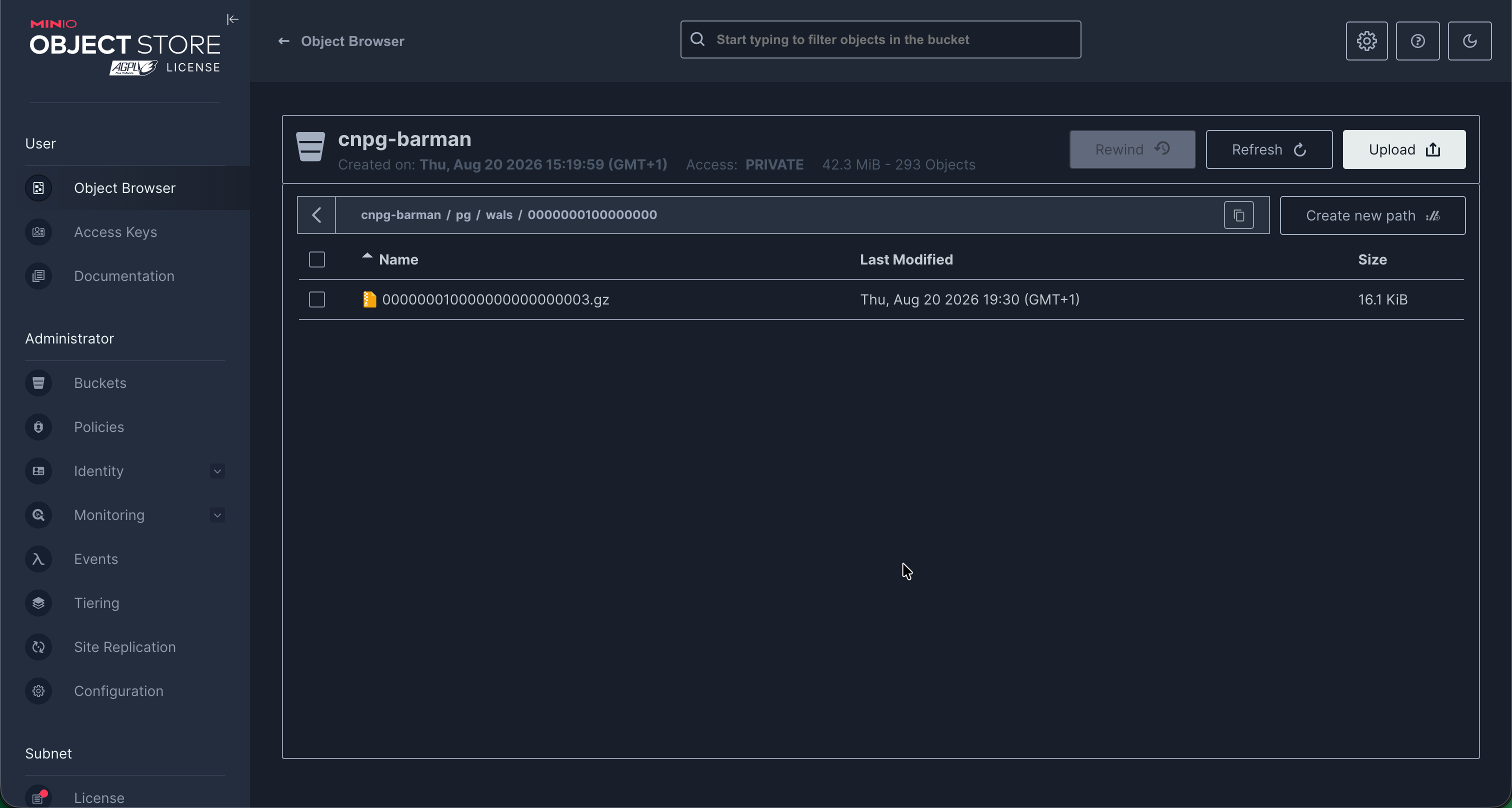 The MinIO console showing the
 cnpg-barman bucket — the base backups under base/ and the
archived WAL under wals/. Your “the data really landed” proof.
That’s an application-consistent backup with PITR. But three things bit me here, and they’re the kind of thing you want to learn in a blog post rather than in an incident:
Gotcha #2 — encryption: "" is dead. Older examples set wal.encryption: "" to
disable server-side encryption. CNPG 1.30’s webhook rejects it — the field now only
accepts AES256/aws:kms. To disable SSE, omit the field entirely.
Gotcha #3 — an idle database can produce un-restorable backups. A backup is only
restorable if its begin_wal segment is in the archive. WAL segments are only
shipped when they fill or are switched — so on a quiet database, the current segment
lingers un-archived, and a backup that references it fails at restore with
WAL ... not found. The fix is archive_timeout (above): force a WAL archive on a
schedule regardless of write activity. I found this the hard way — my first two
“successful” backups were quietly un-restorable. Always verify:
BEGIN=$(kubectl -n postgres get backup <name-o jsonpath='{.status.beginWal}')
# confirm s3://cnpg-barman/pg/wals/.../$BEGIN.gz exists
Gotcha #4 — Barman’s in-tree config is on the way out. spec.backup.barmanObjectStore
is deprecated and removed in CNPG 1.31.0. It works fine on 1.30, but before you
upgrade, migrate to the new Barman Cloud Plugin. Same approach, config moves to a
plugin.
Restoring
Restore in CNPG is a deliberate recreate — you bootstrap a new cluster from the backups. This restores all databases, and can target a specific backup or a point in time:
apiVersion: postgresql.cnpg.io/v1
kind: Cluster
metadata: { name: pg-restored, namespace: postgres }
spec:
  instances: 1
  storage: { size: 5Gi, storageClass: ceph-block }
  bootstrap:
    recovery:
      source: pg
      # recoveryTarget: { backupID: "20260820T154708" }   # or targetTime for PITR
  externalClusters:
    - name: pg
      barmanObjectStore:
        destinationPath: s3://cnpg-barman
        endpointURL: http://minio.minio.svc.cluster.local:9000
        wal: { compression: gzip }
        s3Credentials:
          accessKeyId:     { name: barman, key: aws_access_key_id }
          secretAccessKey: { name: barman, key: aws_secret_access_key }
I wrote a marker row, backed up, recovered into a fresh cluster, and the row was there.
The full cycle works. But notice what this doesn’t cover: the barman and pg-app
secrets, the Services, the Cluster definition itself. If the whole namespace is gone,
you need those back too — and that’s where Kasten comes in.
Part 3 — Orchestrate it all with Veeam Kasten
Barman protects the data. It does not protect the Kubernetes objects around it. A real disaster — a deleted namespace, a lost cluster — needs both: the data and the resources, backed up together and driven on a schedule. That’s the orchestration layer.
The trick is to not let Kasten take a naive volume snapshot of the Postgres PVCs (that would be crash-consistent — the thing we’re trying to avoid). Instead, Kasten uses a Blueprint to delegate the data backup to CNPG’s application-consistent Barman path, while it captures all the surrounding Kubernetes resources itself.
Thanks to Michael Courcy’s kasten-cnpg blueprint, this is two objects:
- A Blueprint (
cnpg-bp) whose backup action creates a CNPGBackupobject and waits for it to complete (and whose delete action removes it when a restore point expires). - A BlueprintBinding (
cnpg-bp-binding) that binds that blueprint to anyclusters.postgresql.cnpg.ioin the cluster — automatically.
kubectl apply -f cnpg-blueprint.yaml
kubectl apply -f cnpg-blueprint-binding.yaml
The binding is the key insight: you do not reference the blueprint in your policy. A lot of people expect to pick a blueprint when creating the policy — you don’t. The binding wires it up, so a plain namespace policy Just Works, and Kasten runs the blueprint whenever it backs up a matching CNPG cluster.
So the policy is an ordinary namespace backup + export:
apiVersion: config.kio.kasten.io/v1alpha1
kind: Policy
metadata: { name: postgres-backup, namespace: kasten-io }
spec:
  frequency: "@daily"
  retention: { daily: 7, weekly: 4 }
  actions:
    - action: backup
      backupParameters:
        profile: { name: kasten-backups, namespace: kasten-io }   # see Gotcha #5
    - action: export
      exportParameters:
        frequency: "@daily"
        profile: { name: kasten-backups, namespace: kasten-io }
        exportData: { enabled: true }
  selector:
    matchExpressions:
      - key: k10.kasten.io/appNamespace
        operator: In
        values: [ postgres ]
Run it, and you can watch the chain fire: the policy run triggers the blueprint, a new
backup-pg-<timestamp> CNPG Backup object appears, Barman completes it to S3, and Kasten
snapshots and exports the namespace’s Kubernetes resources to the location profile.
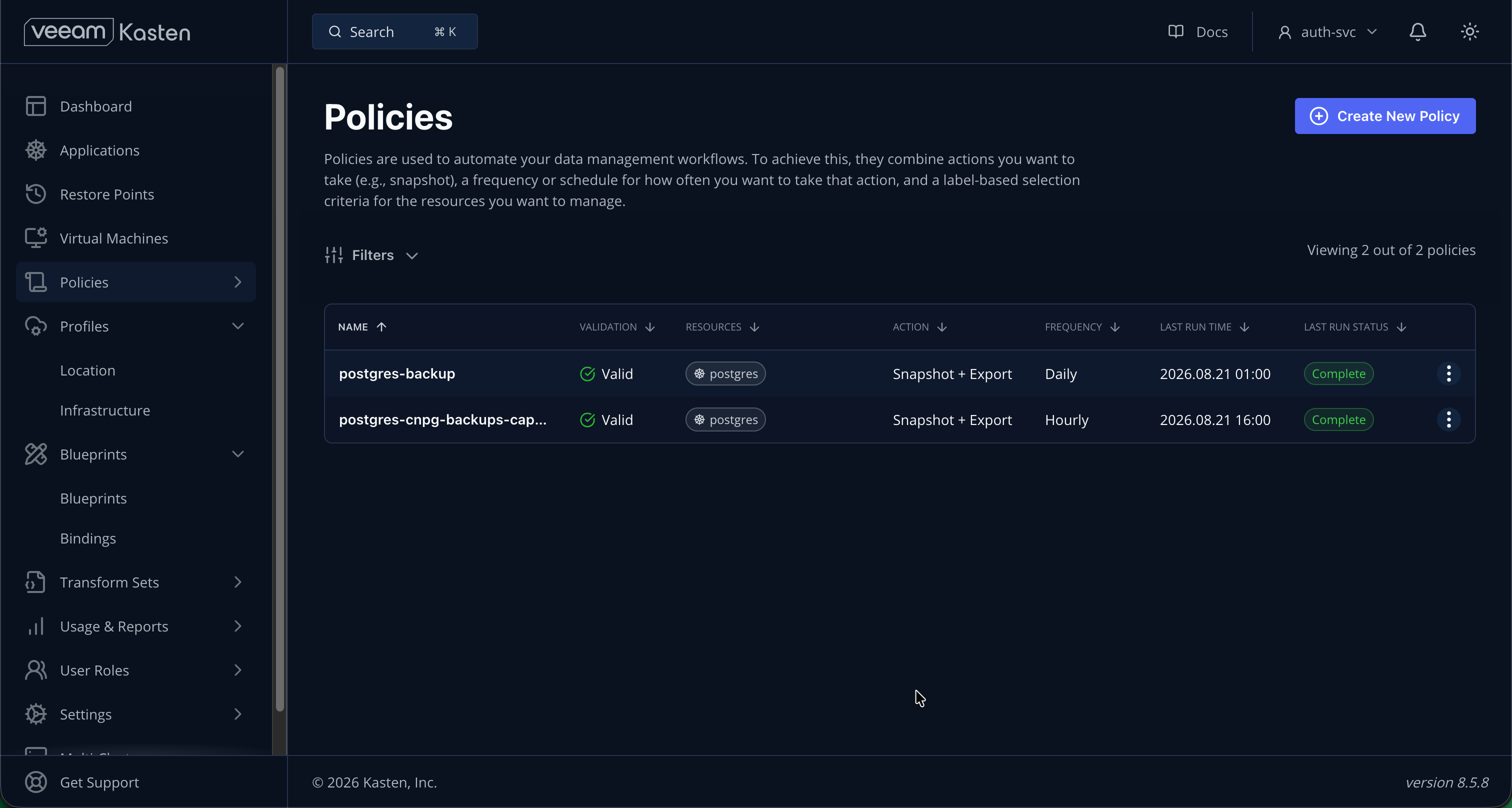 The two policies in the Kasten dashboard, and a green successful run of
 postgres-backup.
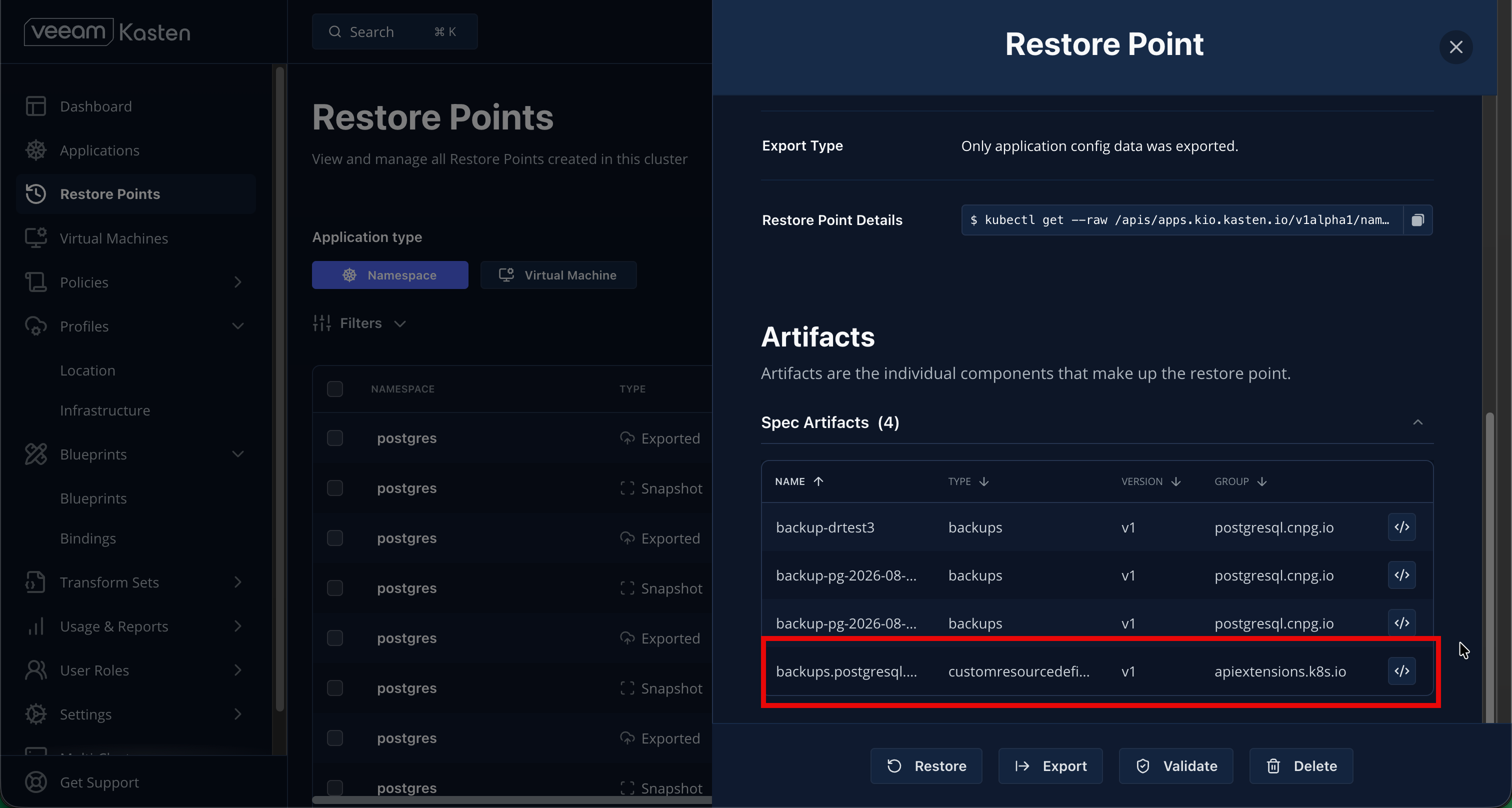 A restore point, expanded — note the captured
 backups.postgresql.cnpg.io object alongside the
namespace’s other resources. That’s the orchestration doing its job.
Gotcha #5 — the Kanister action needs a profile on the backup action. The blueprint
runs as a Kanister action during the backup phase. If you only put a location profile on
the export action, it fails with kanister-profile not found. Put a profile under
backupParameters too. This is the “define a profile for the kanister action, it’s
mandatory” note in the blueprint README, and it’s easy to miss.
Backing up the backups
One subtlety: when a policy run creates a new CNPG Backup object, that object didn’t
exist when the run started — so it isn’t in that run’s restore point. To make sure your
restore points always contain the Backup specs (which carry the backupId you need to
recover after a total loss), add a second, high-frequency policy that captures just those
objects:
  actions:
    - action: backup
      backupParameters:
        profile: { name: kasten-backups, namespace: kasten-io }
        filters:
          includeResources:
            - { group: postgresql.cnpg.io, version: v1, resource: backups }
    - action: export
      # ... export to the same profile ...
The full disaster recovery
Now you’re covered end to end. To recover from a deleted namespace:
- Restore the
barmanandpg-appsecrets from a Kasten restore point (so you can reach the bucket and keep the app credentials). - Recover the CNPG cluster from Barman using the
bootstrap.recoveryspec above, reading thebackupIdfrom the captured Backup object.
Data comes from Barman (application-consistent, PITR); everything else comes from Kasten. That’s the combination that actually gets you back online.
Lessons learned
- Volume snapshots are not database backups. Use the engine’s own backup path (Barman via CNPG) for application consistency, and let your orchestrator trigger it rather than snapshot underneath it.
- Verify restores, don’t assume them. Two of my early backups were silently
un-restorable because of the idle-WAL problem. A backup you haven’t restored is a
hypothesis, not a backup. Set
archive_timeout, and check thebegin_walis archived. - Read the version notes. The in-tree Barman config is deprecated;
encryption: ""is gone. Blindly copying older examples will bite you. - Understand the binding vs. the policy. With a BlueprintBinding you don’t attach the blueprint to the policy — but the Kanister action still needs a location profile on the backup action. Small detail, hard failure.
Wrap-up
Three tools, three jobs: CloudNativePG runs an HA Postgres declaratively, Barman gives you application-consistent physical backups with point-in-time recovery straight to object storage, and Kasten orchestrates that backup alongside every Kubernetes resource the app needs — on a schedule, with retention, and a restore path you’ve actually tested.
That last clause is the whole point. Backups are easy; restores are the feature. Build the chain, then break something on purpose and put it back together — because the first time you run a restore should never be during an incident.
Part of #90DaysOfDataEngineering. Blueprint credit: michaelcourcy/kasten-cnpg.