Kubernetes Foundations
for Backup Admins
You already know how to protect a virtual estate. This module teaches just the parts of Kubernetes you need to protect one — the cluster and its nodes, the workloads, the namespace that holds an application, and the storage layer where snapshots live. Each concept starts from the closest thing you already administer, and no cluster is needed: this is the mental model you will install against in Module 03.
- Describe how a cluster, its control plane, and its nodes divide the work — and name two places the vCenter Server and ESXi host comparison breaks down
- Distinguish a Pod, a Deployment, and a StatefulSet, and explain which carries the data you are paid to protect
- Explain why Veeam Kasten for Kubernetes treats a namespace as an application, and what that means for scoping protection
- Trace a request for storage from PersistentVolumeClaim through StorageClass and the CSI driver to a bound volume and a VolumeSnapshot
- Explain what a Helm chart and a Helm release are, and where Veeam Kasten itself runs once installed
Same job, unfamiliar machinery
This section sets the contract for the module: which of your instincts transfer to Kubernetes, which will mislead you, and the four questions every concept below gets answered against.
Your job does not change: know what exists, decide what is protected, prove it, and get data back when someone deletes the wrong thing. What changes is the unit of protection. In vSphere it is a virtual machine — a long-lived object with an identity and its own disks; in Kubernetes it is an application — running processes that are disposable by design, plus configuration and volumes that are not.
That single shift explains most of what feels strange later: why "restore the machine" is rarely the right recovery request, and why the storage layer matters more here than in a VMware-centric backup design. And you are not learning Kubernetes to develop on it — only the slice that decides what gets backed up, what a restore can put back, and what the storage layer can do.
Three ideas to hold on to
Everything in this module hangs off these. If a later section stops making sense, come back here.
You declare what should exist; the control plane keeps reality matching it. A Veeam Kasten policy (Module 05) works the same way — a declared object on the cluster, not a scheduled job in a console.
A replacement process is one reconciliation away. A deleted volume, or the manifest that described the application, is not.
Veeam Kasten works at that level: it discovers applications on the cluster it runs in and protects them as whole objects — stateful and stateless parts togetherApplication objectVeeam Kasten's application object encapsulates information about all stateful and stateless resources that make up the application..
Every concept below is introduced four ways, in this order: what it is, the closest thing you already administer, where that comparison breaks, and what it means for backup. The third part matters most — an analogy trusted past its limit is worse than none, so each one is retired out loud rather than quietly stretched.
The cluster, the control plane, and the nodes
The three layers of a cluster: which one you talk to, which one runs the work, and where the vCenter Server plus ESXi host picture starts costing you.
A cluster is the whole unit: machines that pool their compute and present one API. A node is one of those machines — physical or virtual — running the workloads; the control plane holds the cluster's desired state, places each workload on a node, and continuously reconciles what is running against what was declared. You never place work by hand — you submit a description to the API and the control plane schedules it.
The command-line client in every Kubernetes procedure — kubectl — is just a client for that API, closer to PowerShell against a management server than to a console session on a host. There is no node-level UI to log into and no per-node inventory to browse.
Where the comparison holds
Where it breaks — and what it costs you
Protecting a node is not a meaningful goal. Nodes hold no unique application state you can restore from.
Veeam Kasten is built to protect Kubernetes applications and cannot be used to deploy or restore a cluster's overall state, so cluster build-out stays with your infrastructure-as-code tooling.
Delete a running workload and the control plane may well recreate it before you finish reading the alert. That is healing, not recovery — the data question is still open.
"Cluster" means something different on each side: a vSphere cluster is a grouping of hosts inside a larger inventory, while a Kubernetes cluster is the entire management domain — its own API, accounts, and nodes. Two Kubernetes clusters are two separate worlds, which is exactly why moving an application between clusters is treated as a restore operation rather than a migration wizard.
Pods, Deployments, and StatefulSets
What runs (a Pod), what keeps it running (a Deployment or a StatefulSet), and which of the two tells you at a glance that there is data worth protecting underneath.
A Pod is the smallest thing Kubernetes runs: one or more containers sharing a network identity and a lifecycle. Pods are created and destroyed constantly — by upgrades, scaling, or a node going away — and nothing inside a Pod's own filesystem is expected to survive replacement. You do not repair a Pod; something replaces it.
Because Pods are disposable, you rarely create one directly — you declare a controller that owns them. A Deployment keeps a set number of identical, interchangeable copies running: right for a web front end or API tier. A StatefulSet keeps copies that each have a stable name and their own storage: right for a database or message broker, where copy three is not interchangeable with copy one.
Pod
Flip ↻Containers running together with a shared network identity — replaced rather than repaired, and renamed when replaced. Closest instinct: a running process group, not a VM. For backup: evidence that something is running, not the thing you restore.
Deployment
Flip ↻A controller that keeps a declared number of interchangeable Pods running and rolls them during upgrades. Closest instinct: a template plus a policy that maintains the fleet. For backup: the declaration matters, not the copies it produced.
StatefulSet
Flip ↻A controller for Pods that each keep a stable identity and their own persistent volume. Closest instinct: the tier you would give dedicated disks. For backup: a strong signal that volumes with data are present.
Why the stateful ones are the ones you protect
Rebuild a stateless front end from its declaration and you have lost nothing; rebuild a database that way and you have an empty database. That asymmetry is why a Kubernetes backup product exists, and Veeam Kasten's dashboard can filter down to only the applications with stateful services — defined as applications containing a persistent volume.
Veeam Kasten classifies Pods, VirtualMachines, StatefulSets, Deployments, and DeploymentConfigs as workloads, and treats an application as multiple Kubernetes resources and workloads together. One application card in its dashboard may therefore account for several volumes, network resources, workloads, and configuration objects at once.
Do not read "StatefulSet" as "everything with data". Some data services are managed by their own custom controllers instead, and Veeam Kasten supports pre- and post-snapshot Blueprint actions for those custom-resource-managed workloads by mapping Pod and volume-claim ownership when a policy runs. The reliable signal that data is present is a persistent volume, not the controller type.
| Object | Closest thing you administer today | Where the comparison breaks |
|---|---|---|
| Pod | A running service on a machine | It has no persistent identity and no lifespan you should depend on |
| Deployment | A VM template plus a rule that keeps N copies up | The copies are not individually meaningful — there is nothing to name or track |
| StatefulSet | A clustered database tier with dedicated disks | Its disks are separate objects with their own lifecycle, not files inside the workload |
A crash-consistent volume snapshot is not always enough for a database — exactly as in a virtual estate. Veeam Kasten handles that with Kanister Blueprints, which run pre- and post-backup hooks for workloads needing application-specific work, such as pausing a database before a backup or migration. You will meet these again when you build policies.
Namespaces: where an application lives
What a namespace groups, why Veeam Kasten treats one as an application, and how that default changes the way you scope a protection policy.
A namespace is a named boundary inside a cluster holding a set of related objects — workloads, configuration, secrets, storage claims, service definitions. Names are unique within it, access control is commonly granted per namespace, and in practice one namespace holds one application with all of its parts. On Red Hat OpenShift the same boundary surfaces as a Project — Veeam Kasten's own install instructions treat the two words as one thing, telling you to create "a project (namespace)" for the installation.
That convention is load-bearing: Veeam Kasten by default equates namespaces to applications — for ease of use, consistency with Kubernetes practice and role-based access control, and because it mirrors the most common deployment pattern. It is a default, not a cage: policies can span more than one namespace, or cover only a subset of one.
The closest thing you know
Where the folder comparison breaks
Moving a VM between folders changes nothing about it; objects do not move casually between namespaces — references, names, and access rules are scoped to the one they are in.
Cluster-scoped objects such as StorageClasses and custom resource definitions live outside every namespace, and an application that depends on them needs a policy that protects both the application and its cluster-scoped resources.
This is the accident you are protecting against — and it takes volumes and their snapshots with it (Section 06 explains why that decides whether a snapshot counts as a backup).
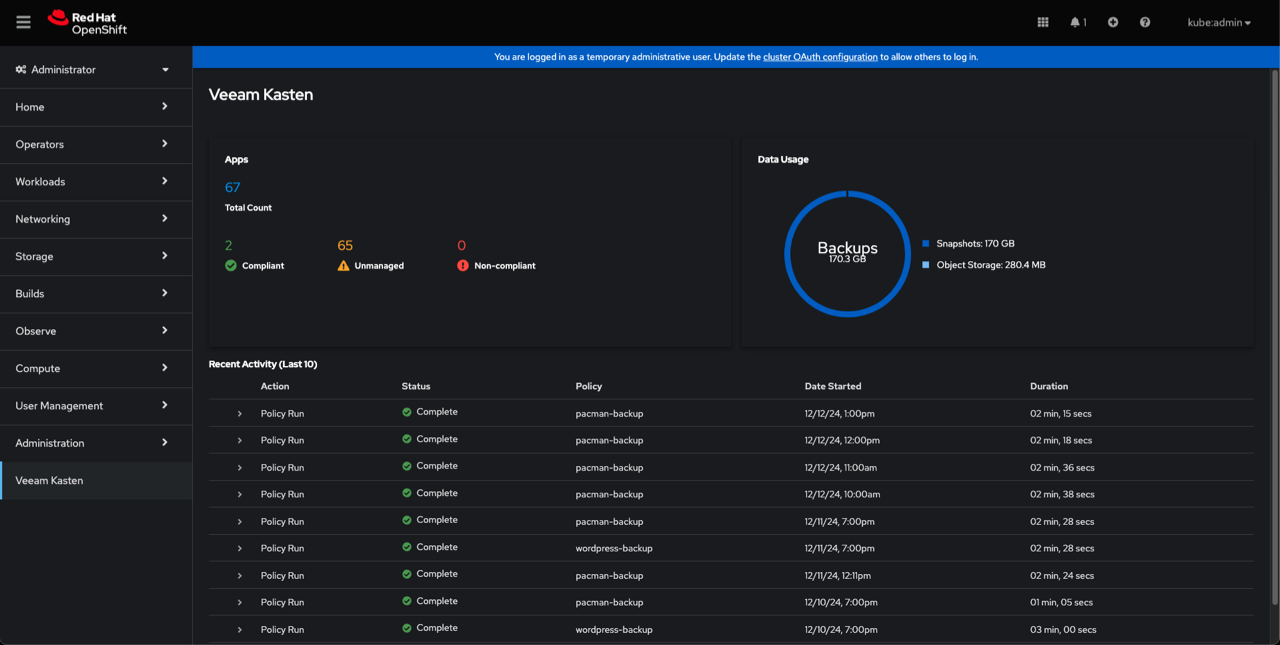
Discovery is the costliest part of onboarding a new estate: finding everything, deciding scope, keeping the list current. Here the inventory maintains itself, and the interesting number is the unmanaged count — applications not yet covered by any policy. That number is your work queue, and namespace is the noun you now think in: when a colleague asks whether something is protected, the answer is a namespace and a policy — not a machine name.
Volumes, claims, and storage classes
A storage request traced from claim to bound volume, the component that does the provisioning, and why this layer sets the ceiling for your data protection design.
Three objects do the work. A PersistentVolumeClaim is the application saying "I need this much storage, of this class"; a StorageClass is the named offering that claim asks for; a PersistentVolume is the actual volume created and bound to the claim. The application author writes the claim; the cluster produces the volume.
The provisioning is done by the CSI driver — the Container Storage Interface is the standard contract between Kubernetes and a storage system. Your array vendor ships the driver; the cluster calls it to create volumes, attach them, and — when the driver can — snapshot them.
What this means for backup
In a virtual estate the storage layer is an implementation detail — the hypervisor presents disks, your backup server reads them. Here it is a first-class dependency: the fast, consistent point-in-time copy belongs to the driver, not the backup product. Veeam Kasten supports direct integration with a set of storage providers — among them Amazon Elastic Block Store, Azure Managed Disks, Google Persistent Disk, Ceph, Cinder-based providers on OpenStack, vSphere Cloud Native Storage, Portworx, and Veeam Backup — as well as integration through CSI.
No snapshot-capable CSI driver? Design problem
Such systems push you onto a file-copy path: Veeam Kasten supports Generic Storage Backups for them, and the documentation states plainly that this approach is not recommended. Most NFS storage services do not provide a CSI driver with snapshot and clone capabilities; migrating persistent data to storage that does is the recommended course.
Snapshot limits are a design input
Verify from your provisioner's documentation whether there is a cap on the total number of snapshots per persistent volume claim — that cap constrains policy retention settings.
Why does storage come up so early in a Kubernetes data protection design? Because the snapshot capability lives in the customer's CSI driver, so the driver they chose sets the ceiling for how efficiently their applications can be protected. Establishing that before a deployment is far cheaper than discovering it during one.
VolumeSnapshots, and why drivers differ
The three conditions that let Veeam Kasten take CSI volume snapshots, why a snapshot on its own is not a backup, and how Veeam Kasten stops one being deleted underneath you.
A VolumeSnapshot is a Kubernetes object that asks the storage layer for a point-in-time copy of a volume. The request is standard; the ability to honour it is a property of each individual CSI driver. So the useful question is never "can Kubernetes snapshot a volume" but "can this driver snapshot a volume".
Veeam Kasten can invoke volume snapshot operations through CSI when three requirements are met: Kubernetes v1.14.0 or higher, the VolumeSnapshotDataSource feature enabled in the cluster, and a CSI driver that has Volume Snapshot support. The first two are inherited history — supported releases start at Kubernetes 1.31 on a certified distribution, with 1.30 and 1.29 supported only as OpenShift — so only the third still has to be proved on your cluster. Using a CSI driver with VolumeSnapshot support is described as a requirement for building a good data protection solution with Veeam Kasten.
Prove it before you design around it
Whether a CSI provisioner supports VolumeSnapshots may be stated in the storage vendor's documentation, and it can also be validated with Veeam Kasten's own tooling rather than taken on trust.
The CSI pre-flight check is a real test
Run with a specified StorageClass, the primer tool (which you install and run in Module 03) runs in a Pod in the cluster: it creates a sample application with a persistent volume, writes data, snapshots the volume, creates a new volume from that snapshot, and validates the data.
One annotation makes a class usable
An annotation is a small key-value note attached to a Kubernetes object's metadata — tools like Veeam Kasten read specific annotations to decide how to treat the object. For each CSI driver, a VolumeSnapshotClass has to carry the Veeam Kasten annotation before its snapshots can be used. You apply it in Module 03; recognise it here.
kind: VolumeSnapshotClass
metadata:
  annotations:
    k10.kasten.io/is-snapshot-class: "true"
  name: csi-hostpath-snapclass
The annotation and class name above are quoted from the Storage Integration reference. k10 appears in lowercase inside the annotation key k10.kasten.io/is-snapshot-class because that key is a verbatim technical string; the product name is Veeam Kasten.
First, know that a CSI snapshot is really two objects: the VolumeSnapshot request inside the application's namespace, and a cluster-scoped VolumeSnapshotContent that points at the actual copy on the storage system.
CSI snapshots are not durable: a snapshot has a namespaced VolumeSnapshot object and a non-namespaced VolumeSnapshotContent object, and with the default and recommended deletion policy, deleting the volume or its namespace cascades into deleting the VolumeSnapshotContent object and therefore the underlying storage snapshot. Setting deletionPolicy to Delete is not sufficient either, because some storage systems force snapshot deletion when the associated volume is deleted, and snapshots can also be force-deleted through the array's own management interface. Enabling backups together with volume snapshots is therefore required for a durable backup.
The parallel you already trust
Where it is sharper here
In a virtual estate, deleting a VM does not commonly reach into the array and remove its snapshots. Here the cascade is documented behaviour.
It creates a clone of the original VolumeSnapshotClass with the deletion policy set to
Retain, and when restoring a CSI VolumeSnapshot it creates an independent replica using that cloned class to avoid accidental deletion of the underlying content.Snapshots give you speed on the cluster; an exported backup gives you the copy that survives the cluster. You need both, and that is a policy decision you will make in Module 05.
Helm: charts, values, and releases
What a Helm chart is, what a release is, and what the Module 03 install command is doing — a familiar act rather than an incantation.
Helm is the package manager for Kubernetes applications. A chart is the package — a parameterised set of Kubernetes object definitions plus their defaults — and values are the parameters you override at install time. A release is one named installation of a chart into a cluster: upgradeable in place, and rolled back or removed as a unit.
Closest instinct: an installer package plus an answer file — the chart is the package, the values are the answers, the release is the installed instance you later patch. Where it breaks: a release is not files on a machine but a set of objects in the cluster's API, so an upgrade is a declaration change rather than a program that runs on a server.
| Term | What it is |
|---|---|
| Chart repository | Where Helm pulls charts from. Veeam Kasten's charts come from the Kasten Helm charts repository, added to Helm before installing. |
| Chart version | Selects which Veeam Kasten version you install — pinning it controls what lands in the cluster. |
| Release name | The name you give the installation. The documented install names the release k10. |
| Target namespace | Where the release's objects are created. The install default is kasten-io. |
helm repo add kasten https://charts.kasten.io/helm repo updatehelm install k10 kasten/k10 --namespace=kasten-ioRead it as three sentences: know where the charts live, refresh that knowledge, then create a release called k10 from the kasten/k10 chart inside the kasten-io namespace. Commands quoted from the install reference.
Two version checks save time later. The Helm 3 package manager has to be in place before installing, at a version compatible with the Kubernetes cluster you are deploying into. The chart can also be signature-verified with the published public key during installation.
Helm is not the only route in: on Red Hat OpenShift there are two documented install methods — Helm-based and Operator-based. Whichever you choose, the documentation encourages automating that deployment with the same tooling that builds the cluster, so that after a total cluster loss you can rebuild the platform and then recover applications and data with Veeam Kasten.
Values files raise one last question — where configuration and credentials actually live. Two namespaced objects you will keep meeting:
ConfigMap — the ordinary settings
Secret — the sensitive values
A Secret keeps sensitive values out of pod definitions, container images, and values files; at runtime it is mounted or injected into the pods that need it.
Treat access to Secrets with the same care you give stored credentials today.
Secrets are part of what a policy protects — which is why a restored application can authenticate at all.
Where Veeam Kasten sits in all of this
Veeam Kasten's place in a cluster — where it runs, what shape it takes, how it finds applications — and how that differs from the management server you are used to installing.
Veeam Kasten does not sit beside the cluster looking in — it runs inside it, as a set of its own services in their own namespace. The install default is kasten-io, and you confirm the platform is healthy by watching its Pods reach a running state.
Those services are individually named — an aggregated API service, an authentication service, a catalog service and others appear in the Pod list — and Veeam Kasten's own tooling talks about validating a cluster before installation and debugging the platform's micro services afterwards. Read that as a design statement: not one monolithic server process, but cooperating in-cluster components.
kubectl get pods --namespace kasten-io --watchThe documented validation step. All of the Pods should ultimately display a status of Running; it may take a couple of minutes for them to come up.
It discovers instead of being told
Veeam Kasten's application object abstracts an application automatically discovered on the cluster where it runs, capturing stateful and stateless resources together. No inventory to register, no agent to push.
It speaks the cluster's own language
Policies encode business rules and translate them into the actions applied to discovered applications. Its own objects — policies, profiles, actions, restore points — live in the cluster API like any other resource.
It is hardened as an in-cluster tenant
All Veeam Kasten Pods enable a read-only root filesystem security context by default, with writable paths backed by dedicated volume mounts. On Red Hat OpenShift it installs customized SecurityContextConstraints (SCC) so that all its associated workloads have just enough privileges for their respective tasks.
A Veeam Backup & Replication server outlives the workloads it protects; an in-cluster platform does not — if the cluster is gone, Veeam Kasten is gone with it. That is why exported backups and a documented way to recover the platform itself matter here, and why the documentation is explicit that Veeam Kasten protects Kubernetes applications and cannot be used to deploy or restore the cluster's overall state. Module 04 picks this up.
Which scope does each object live in?
Scope decides what a namespace-based policy can reach. File each object where it lives — each filing explains the reasoning, and you can refile as often as you like.
0 of 6 filed correctly
Cards to sort
0 of 6 cards filed.
Click a card above, then click a bucket below to file it. Click a filed card to move it back.
Check your understanding
Five questions, one best answer each — and every option explains itself once you choose.
What you covered
You now have the vocabulary and the mental model the rest of this course assumes. Next you install against it.